Table of Contents
- 1. What's Included
- 2. Installation
- 3. Basic Standalone Wiring
- 4. Pass-Throught Wiring (Wiegand Reader or Controller)
- 5. Advanced Input and Output Features
- 6. Sound and Light Indication
- 7. PIERRE Wiring Diagram
- 8. Basic Configuration
- 9. Changing the Master Code
- 10. Set the Working Mode
- 11. STANDALONE MODE
- 12. Common Power Supply
- 13. Access Control Power Supply
- 14. Programming
- 15. Add Card User
- 16. Add PIN User
- 17. Add Panic User
- 18. Add Visitor Users
- 19. Change User PIN
- 20. Delete Users
- 21. Set Relay Configuration
- 22. Set Access Mode
- 23. Set Strike-out Alarm
- 24. Set Door Open Detections
- 25. Set Audible and Visual Response
- 26. Using Master Card to add and delete users
- 27. Users Operation & Reset to Factory Default
- 28. CONTROLLER MODE
- 29. Connection Diagramm
- 30. Set Wiegand Input Formats
- 31. Programming
- 32. Device Connected with Keypad Reader
- 33. WIEGAND READER MODE
- 34. Connection Diagramm
- 35. Set Wiegand Output Formats
- 36. ADVANCED APPLICATION
- 37. Connection Diagram
- 38. Set Transferring on Master Unit
- 39. Interlock
- 40. Connection Diagram
- 41. Interlock Setup and Configuration
1. What's Included
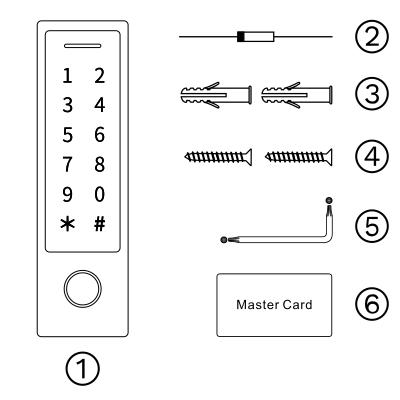
- RFID Reader
- Diode IN404 (For relay circuit protection)
- Wall Anchors
- Self Tapping Screws ϕ 4x25 mm
- Screw Driver
- Master Card
2. Installation
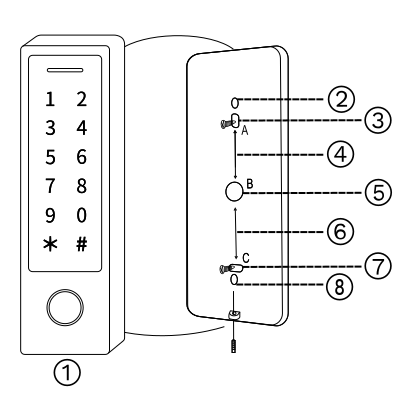
- RFID Reader
- ϕ 3x3 mm
- ϕ 4x6 mm screw hole
- 39 mm distance between A and B hole
- ϕ 9x9 Cable opening
- 39 mm distance between B and C hole
- ϕ 3x6 mm screw hole
- ϕ 3x3 mm
Installation Steps:
- Remove the back cover of the device.
- Drill two holes (A,B) on the wall for screws and one for the cable.
- Insert the provided rubber plugs to the screw holes (A,C)
- Secure the back cover on the wall with 4 flat head screws.
- Thread the cables through the wall opening (B),
- Attach the main device to the back cover.
3. Basic Standalone Wiring
| Wire Color and Function | Note |
|---|---|
| Red - DC+ | 12-18V DC Power Input |
| Black - GND | Negative Pole of the DC Power Input |
| Blue - Relay NO | Normally Open Relay Output (install diode provided) |
| Purple - Relay Common | Common Connection for Relay Output |
| Orange - Relay NC | Normally Closed Relay Output (install diode provided) |
| Yellow - OPEN | Request to Exit (REX) Input |
4. Pass-Throught Wiring (Wiegand Reader or Controller)
| Wire Color and Function | Note |
|---|---|
| Green - Data 0 | Wiegand Output (Pass-through) Data 0 |
| White - Data 1 | Wiegand Output (Pass-through) Data 1 |
5. Advanced Input and Output Features
| Wire Color and Function | Note |
|---|---|
| Grey - Alarm Output | Negative contact for Alarm |
| Brown - Contact Input | Door/Gate Contact Input (Normally Closed) |
6. Sound and Light Indication
| Operation Status | LED and Buzzer |
|---|---|
| Stand by | Red light brigt - no buzz |
| Enter into programming mode | Red light flashes - one beep |
| In programming mode | Orange light bright - one beep |
| Operation error | No light indication - just three beeps |
| Exit from programming mode | Red light bright - one beep |
| Open lock | Green light bright - one beep |
| Alarm | Red light flashes quickly - many beeps |
7. PIERRE Wiring Diagram

This wiring diagram illustrates the proper connection of an RFID keypad access control system to a central PIERRE controller. The system requires a 12V power supply, which is distributed to both the controller and the keypad.
The communication between the keypad and the controller is established through dedicated data lines, ensuring secure transmission of access credentials. Additionally, indicator connections are included, such as the buzzer and LED, which provide visual and auditory feedback upon keypresses or access validation.
A doorbell function is also integrated into the system. Pressing the bell button on the keypad sends a signal through designated wires, which the controller processes to trigger the corresponding output.
Proper grounding is essential for stable operation, ensuring reliable communication and minimizing electrical noise. Following this wiring layout allows for seamless integration of the access control system into a building’s security infrastructure.
8. Basic Configuration
Entering Program Mode
- Press * followed by the Master Code (Factory default: 123456), then #
- The LED will light up to indicate programming mode.
- To exit Program Mode press *
9. Changing the Master Code
- Enter Program Mode with "* Master Code # "
- To change the Master Code press 0 (New Master Code) # (Repeat New Master Code) #
- Use a 4-6 digit code.
10. Set the Working Mode
The device has 3 working modes:
- Standalone Mode
- Controller Mode
- Wiegand Reader Mode
Choose the mode you want to use:
- Enter Program Mode (* Master Code #)
- For Standalone/Conroller Mode press 7 7 # (Factory default)
- For Wiegand Reader Mode press 7 8 #
- to exit press *
11. STANDALONE MODE
The device can work as Standalone Access Control for a door. Factory default mode - 7 7 #
Attention: Install a 1N4004 or equivalent diode is needed when using a common power supply, or the keypad might be damaged. (1N4004 is included in the packaging)
12. Common Power Supply

13. Access Control Power Supply

14. Programming
The programming process will vary based on the access configuration. Ensure you follow the instructions specific to your chosen configuration.
- User ID number: Assign a user ID to access card/PIN in order to track it
- Common User IDs:
- PIN/Card user ID: 100 - 987
- Panic user ID: 988 - 989
- Visitor user ID: 990 - 999
- Common User IDs:
Note: User IDs do not require leading zeros. It is crucial to record the User ID accurately. Any modifications to the User ID will require access to the original User ID.
- Proximity Card: EM Card or EM + Mifare cards
- PIN: Can be any 4-6 digits, except 8888 which is reserved.
15. Add Card User
- Entering Programming Mode:
To enter programming mode, press *, followed by the Master Code, and then #. - Adding a Card User:
There are three methods to add a card user:- Using Auto ID:
Automatically assigns the next available User ID, allowing cards to be added consecutively.- Enter: 1.
- Either swipe the card on the reader or manually input the 8, 10, or 17-digit card number, and then press #.
- Using Auto ID:
- Assigning a Specific User ID:
Assign a specific User ID (e.g., 101 for the first user) to the card. Cards can also be added consecutively using this method.- Enter: 1 User ID #.
- Either swipe the card on the reader or manually input the 8, 10, or 17-digit card number, and then press #.
Allows up to 888 cards to be added to the reader in one step.
- Enter: 1 User ID # Card Quantity #.
- Then, input the 8, 10, or 17-digit number of the first card, and press #.
Important Note:
- Card numbers must be added in consecutive order.
- Card Quantity refers to the total number of cards being enrolled in this batch.
16. Add PIN User
- Entering Programming Mode:
To enter programming mode, press *, followed by the Master Code, and then #. - Adding a PIN User:
There are two methods to add a PIN user:- Using Auto ID:
- Automatically assigns the next available User ID, allowing PINs to be added consecutively.
- Enter: 1, followed by the desired PIN, and then #.
- Using Auto ID:
- Assigning a Specific User ID:
- Enter: 1 User ID, PIN #.
Important Notes:
- PINs can be 4 to 6 digits long.
- Keep a record of assigned User IDs to prevent duplication or confusion.
- Ensure the User ID falls within the appropriate range for the user type: 100–987 for cards.
17. Add Panic User
- Enter Programming Mode:
- Press *, followed by the Master Code, and then #.
Panic User IDs are 988 and 989.
- Add a Panic User:
- Card User: Press 1, followed by 988 or 989, swipe the card to register it as a Panic User and then #.
- PIN User: Press 1, followed by 988 or 989, enter the desired 4–6 digit PIN, followed by #.
- Press * to exit programming mode.
Important Notes:
- Panic users are typically configured for emergency access scenarios.
- Ensure that these IDs are reserved for authorized personnel only, as they might trigger specific emergency features.
18. Add Visitor Users
- Enter Programming Mode:
- Press *, followed by the Master Code, and then #.
Visitor User IDs are reserved as 990 to 999.
- Add a Visitor User:
- Card User: Press 1, followed by 990 to 999, swipe the card to assign it as a visitor user, then #.
- PIN User: Press 1, followed by 990 to 999, enter the desired 4–6 digit PIN, followed by #.
- Press * to exit programming mode.
Important Notes:
- Visitor users are typically configured for temporary or guest access.
- Ensure visitor IDs are monitored and properly deactivated when no longer needed.
- Avoid using reserved numbers for non-visitor users to maintain consistency and system organization.
19. Change User PIN
The following actions are performed outside of programming mode and can be completed by users independently.
- To change the PIN for an existing user, follow these steps:
- Enter *, followed by the User ID # Old PIN # New PIN #, New PIN one more time, then #.
- To Change the PIN of a Card (The system will automatically allocate the PIN 8888 to cards during the adding process.):
- Enter *, Read Card, Old PIN # New PIN #, New PIN one more time, then #.
Important Notes:
- The PIN must be 4 to 6 digits long.
- Avoid using reserved PINs like 8888.
- Always keep a record of User IDs and PINs for accurate management.
20. Delete Users
- Enter Programming Mode:
- Press *, followed by the Master Code, and then #.
- Delete a User by User ID:
- Enter 2, followed by the User ID, and then #.
- The system will confirm the deletion with a beep.
- Enter 2, then input the Card Number, and press #.
- The system will confirm the deletion with a beep.
- Enter 2, then Master Code, and #.
- All users will be deleted, and the system will confirm with a beep.
- Press * to exit.
Important Notes:
- Always record and verify User IDs or Card Numbers before deletion to prevent accidental loss of important users.
- Deleting all users cannot be undone; ensure it is used with caution.
21. Set Relay Configuration
The relay configuration determines the behavior of the output relay during activation. The configuration can be adjusted as follows:
- Enter Programming Mode:
- Press *, followed by the Master Code, and then #.
- Adjust Relay to Pulse Mode:
- Enter 3, followed by the desired duration in seconds (1–99), and then #.
- Example: To set the relay activation time to 5 seconds, enter 3 5 #.
- Enter 3, followed by 0, and then #.
- This sets the relay to stay on until manually turned off.
- Press * to exit.
Important Notes:
- The relay time defaults to 5 seconds.
- Toggle mode is typically used for continuous access, while pulse mode is ideal for momentary door unlocking.
22. Set Access Mode
For multi-user access mode, the interval time of reading cannot exceed 5 seconds. If the interval exceeds this limit, the device will automatically return to standby mode.
- Enter Program Mode:
- Press *, followed by the Master Code, and then #.
- Set Access Mode:
- Card Access: Enter 4 1#.
- PIN Access: Enter 4 2#.
- Card + PIN Access: Enter 4 3#. (WiFi versions do not support this function.)
- Press * to exit.
23. Set Strike-out Alarm
The strike-out alarm will activate after 10 failed entry attempts. By default, it is OFF. It can be configured to deny access for 10 minutes or to disengage only after entering a valid card, PIN, or Master Code.
- Enter Programming Mode:
- Press *, followed by the Master Code, and then #.
- Configure Strike-out Alarm:
- Turn Strike-Out OFF: Enter 60# (factory default).
- Turn Strike-Out ON: Enter 61#.
- Access will be denied for 10 minutes.
- The exit button will still function.
- Turn Strike-Out ON with Alarm: Enter 62#.
- Enter 5 (0~3)#.
- Factory default is 1 minute.
- Enter the Master Code, or Master Card.
- Use a valid user card, or PIN.
- Press *
24. Set Door Open Detections
Door Open Too Long (DOTL) Detection
- When used with an optional magnetic contact or built-in magnetic contact of the lock:
- If the door is opened normally but not closed within 1 minute, the inside buzzer will beep automatically to remind people to close the door.
- The beep can be stopped by:
- Closing the door.
- Using a Master User or Valid User credentials.
- Otherwise, it will continue to beep for the duration set by the alarm time.
Door Forced Open Detection
- When used with an optional magnetic contact or built-in magnetic contact of the lock:
- If the door is opened by force, the inside buzzer and external alarm (if available) will activate.
- The alarm can be stopped by:
- Master Users.
- Valid Users.
- Otherwise, the alarm will continue to sound for the duration set by the alarm time.
Programming Steps for Door Open Detection
- Enter Programming Mode:
- Press *, followed by the Master Code, and then #.
- Configuration Options:
- Disable Door Open Detection: Enter 6 3# (factory default).
- Enable Door Open Detection: Enter 6 4#.
- Set Alarm Time: Enter 5 (0~3)#.
- Factory default is 1 minute.
- Press * to exit.
Additional Note:
- The function of Set Alarm Time also applies to the anti-tamper alarm.
25. Set Audible and Visual Response
- Enter Program Mode:
- Press *, followed by the Master Code, and then #
- Configuration Options:
- Disable Sound: Enter 7 0 #
- Enable Sound: Enter 7 1 # (factory default).
- LED Always OFF: Enter 7 2 #
- LED Always ON: Enter 7 3 # (factory default).
- Keypad Backlit Always OFF: Enter 7 4 #
- Keypad Backlit Always ON: Enter 7 5 #
- Keypad Backlit Automatic OFF: Enter 7 6 # (factory default).
Note: The keypad backlight will turn off automatically after 20 seconds. It will turn on again by pressing any key (the pressed key will not be registered).
- Exit Program Mode:
- Press * to exit.
- Press * to exit.
26. Using Master Card to add and delete users
Add Card, or PIN Users:
- Input the Master Card.
- Add the user by one of the following methods:
- Swipe the Card.
- Input the PIN, followed by #
Delete Card, or PIN Users:
- Input the Master Card twice within 5 seconds.
- Delete the user by one of the following methods:
- Swipe the Card.
- Input the PIN, followed by #
27. Users Operation & Reset to Factory Default
- Open the Door:
- Use a valid user card, or input a valid user PIN followed by #.
- Remove Alarm:
- Enter the Master Code followed by #, or use the Master Card, or a valid user credential (card, or PIN).
To Reset to Factory Default & Add Master Card:
- Power off the device.
- Press and hold the Exit Button while powering the device back on.
- You will hear two beeps.
- Release the Exit Button.
- The LED will turn yellow.
- Present any 125KHz EM card or 13.56MHz Mifare card.
- The LED will turn red, indicating a successful reset to factory default.
- The card used will be assigned as the Master Card.
Additional Note:
- If no Master Card has been added, you must press the Exit Button for at least 5 seconds before releasing it.
- This will invalidate any previously registered Master Card.
- Resetting to factory default retains the user information.
28. CONTROLLER MODE
The device can function as a controller when connected to an external Wiegand reader.
Factory default mode: Enter 7 7 #
Attention:
- Install a 1N4004 diode (or equivalent) when using a common power supply to prevent damage to the reader.
- A 1N4004 diode is included in the package.
29. Connection Diagramm

30. Set Wiegand Input Formats
Configure the Wiegand input formats to match the output format of the external reader.
Programming Steps:
- Enter Program Mode:
- Press *, followed by the Master Code, and then #
- Set Wiegand Input Bit:
- For EM Cards:
- Enter 8 (26~44) # (factory default is 26 bits).
- For Mifare Cards:
- Enter 8 0 (26~44, 56, 58) # (factory default is 34 bits).
- For EM Cards:
- Disable Parity Bit: Enter 8 0 #
- Enable Parity Bit: Enter 8 1 # (factory default).
- Press *
Note:
When connecting Wiegand readers with 32, 40, or 56-bit output, parity bits must be disabled.
31. Programming
- Basic programming process is the same as Standalone Mode.
- Device Connected with External Card Reader:
- For EM/Mifare Card Readers: Users can be added or deleted on either the device or the external reader.
- For HID Card Readers: Users can only be added or deleted on the external reader.
32. Device Connected with Keypad Reader
The keypad reader supports 4 Bits, 8 Bits (ASCII), or 10 Bits output formats. Choose the appropriate operation based on your reader's PIN output format.
- Enter Program Mode:
- Press *, followed by the Master Code, and then #
- Set PIN Input Bits:
- Enter 8 (4 or 8 or 10) #
- (Factory default is 4 bits).
- Press *
Remarks:
- 4 means 4 bits.
- 8 means 8 bits.
- 10 means a 10-digit virtual number.
Add PIN Users:
- After entering programming mode, PIN(s) can be added on either the device or the external keypad reader.
Delete PIN Users:
- Follow the same procedure as adding users to delete them.
33. WIEGAND READER MODE
The device can function as a Standard Wiegand Reader, allowing it to connect to a third-party controller.
Activate Wiegand Reader Mode: Enter 7 8 #
Notes:
- Settings Changes in Wiegand Reader Mode:
- When the device is set to Wiegand Reader Mode, nearly all settings in Controller Mode will become invalid.
- The Brown and Yellow wires will be redefined as follows:
- Brown wire: Controls the Green LED light.
- Yellow wire: Controls the Buzzer.
- When the input voltage for the LED is low, the Green LED will turn on.
- When the input voltage for the Buzzer is low, it will sound.
34. Connection Diagramm

35. Set Wiegand Output Formats
Configure the Wiegand output formats of the reader to match the input formats of the controller.
- Enter Program Mode:
- Press *, followed by the Master Code, and then #
- Set Wiegand Output Bits:
- For EM Cards:
- Enter 8 (26~44)#. (Factory default is 26 bits)
- For Mifare Cards:
- Enter 8 0 (26~44, 56, 58)# (Factory default is 34 bits).
- For PIN Output Bits:
- Enter 8 (4 or 8 or 10)# (Factory default is 4 bits).
- For EM Cards:
- Disable Parity Bit: Enter 8 0 #
- Enable Parity Bit: Enter 8 1 # (Factory default).
- Press *
Note:
- When connecting to Wiegand controllers with 32, 40, or 56-bit input, parity bits must be disabled.
36. ADVANCED APPLICATION
Collection Card Mode
When this mode is activated, all cards can open the lock. At the same time, the card is added to the device.
Programming Steps:
- Enter Program Mode:
- Press *, followed by the Master Code, and then #
- Configure Collection Card Mode:
- Turn OFF: Enter 9 2 # (Factory default).
- Turn ON: Enter 9 3 #
- Press *
User Information Transfer (Valid for Card/PIN Users)
This feature allows the transfer of enrolled user data (cards, PINs) from one device (referred to as the "Master Unit") to another device (referred to as the "Accept Unit").
Note:
- The Master Unit and Accept Unit must be devices of the same series.
- The Master Code of both the Master Unit and Accept Unit must be identical.
- Perform the transfer operation only on the Master Unit.
- If the Accept Unit already has users enrolled, they will be overwritten after the transfer.
- Transferring the maximum of 900 users takes approximately 30 seconds.
37. Connection Diagram

38. Set Transferring on Master Unit
- Enter Programming Mode:
- Press *, followed by the Master Code, and then #
- Initiate Transferring:
- Enter 9 8 #
- Within 30 seconds, the Green LED will shine.
- After one beep, the LED will turn red, indicating the user information has been successfully transferred.
- Press *
39. Interlock
The device supports the Interlock Function, which is designed for managing two devices controlling two doors. It is primarily used in banks, prisons, and other locations requiring a higher level of security.
40. Connection Diagram

41. Interlock Setup and Configuration
A Door Contact must be installed and connected as shown in the diagram.
Let’s name the two devices as “A” and “B” for two doors “1” and “2”.
Step 1: Enroll Users
- Enroll the users on Device A.
- Transfer the user information to Device B using the User Information Transfer function.
Step 2: Set Both Devices (A and B) to Interlock Function
- Enter Program Mode:
- Press *, followed by the Master Code, and then #
- Configure Interlock:
- Disable Interlock: Enter 9 0 # (factory default).
- Enable Interlock: Enter 9 1 #
- Press *
If interlock is enabled:
- When only Door 2 is closed, the user can read the valid fingerprint/card or input a PIN on Reader A to open Door 1.
- Similarly, when only Door 1 is closed, the user can read a valid fingerprint/card or input a PIN on Reader B to open Door 2.